Bihar School Examination Board has recently been invited to the OFSS Bihar Intermediate Admission 2026 Online for Session 2026-28 through the Online Facilitation System Portal for the Students.
Bihar Board Intermediate Admission 2026
All Eligible & Interested Students Can Apply Online for Bihar Board Intermediate Admission 2026 by the below link Online.ofssbihar.net.
Students have matriculation passes from any recognized board in India like BSEB, CBSE, ICSE, and others. Apart from BSEB, CBSE, ICSE, and other board students are also provided with a separate opportunity to apply online. As the CBSE and ICSE Board 10th Exam Result has just been declared, CBSE and ICSE Board students can apply online when CBSE and ICSE Board students are released.
Bihar Board Intermediate Admission 2026 Form Apply
- 1 Bihar Board Intermediate Admission 2026 Form Apply
- 2 OFSS Bihar 11th Admission 2026 Selection Process
- 3 BSEB Inter Admission 2026 Last Date https www ofssbihar net Higher Education index aspx
- 3.1 OFSS 11th Admission 2026 Required Documents
- 3.2 OFSS Bihar Admission 2026 Eligibility Criteria
- 3.3 Bihar Board Inter Class Stream
- 3.4 Bihar OFSS Intermediate (11th) Admission 2026 Reservation
- 3.5 OFSS Bihar Inter Admission 2026 Important Information for Educational Institutions
- 3.6 How to check the OFSS Admission 2026 College Wise Seats List
- 4 OFSS Intermediate Admission 2026
- 5 OFSS Bihar Intermediate Admission 2026 Online.ofssbihar.net
- First of all, you have to go to the official website of OFSS Bihar https://www.ofssbihar.net/Higher-Education/interinner.aspx.
- As soon as you go to the official website of Inter admission online 2026 OFSS portal, its home page opens in front of you, you have to scroll down a bit and here you will see a link named Common Application Form for Admission in Intermediate Colleges and Schools.
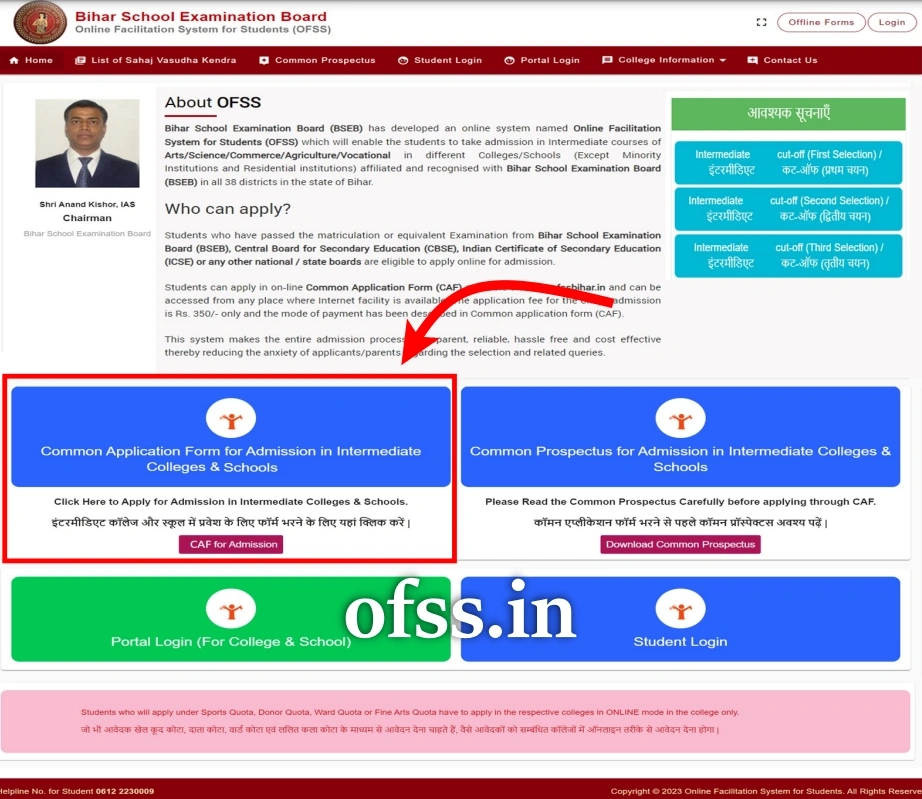
- After clicking on the link of the Common Application Form for Admission in Intermediate Colleges and Schools, a new page will open in front of you.
- Now the main instructions for filling the application form through OFSS Bihar will open in front of you.
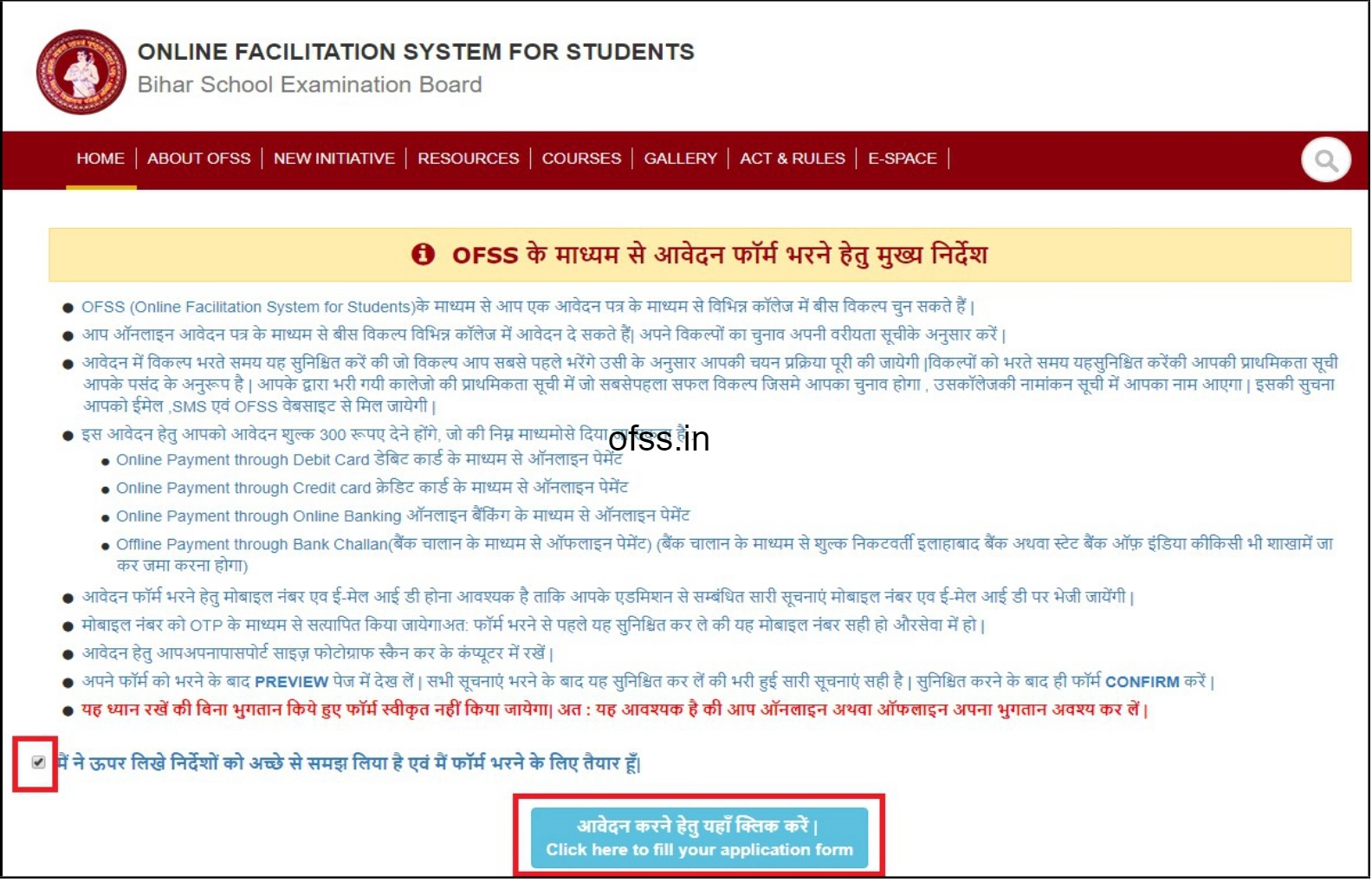
- At the bottom, “मैंने ऊपर लिखी निर्देशों को अच्छे से समझ लिया है एवं मैं फॉर्म भरने के लिए तैयार हूं”, now click on the “आवेदन करने हेतु यहां क्लिक करें” as shown below.
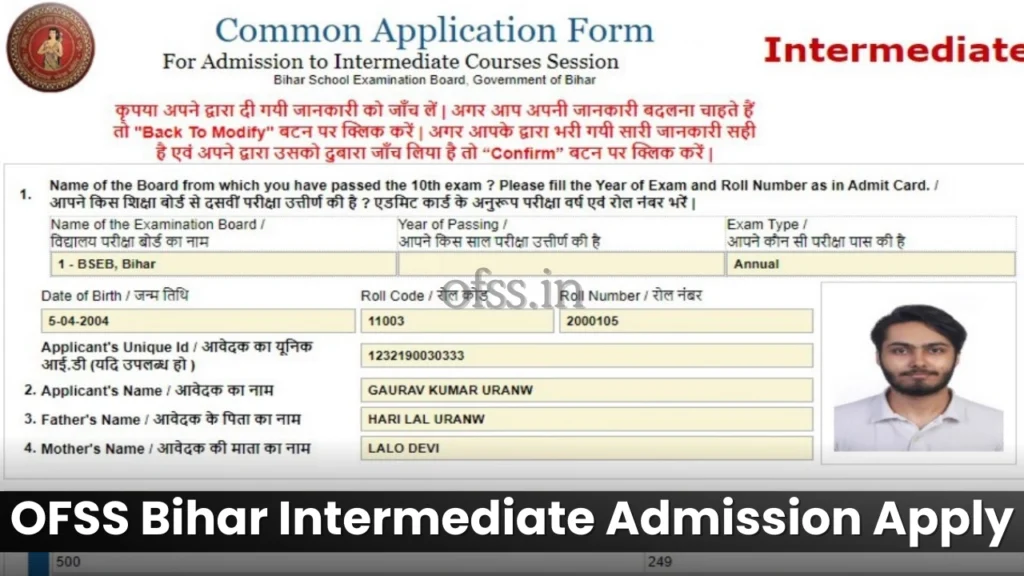
- As soon as you click on the link to apply, the application form Common Application Form for Admission to Intermediate Course Season 2026-2028 opens in front of you, as shown here.
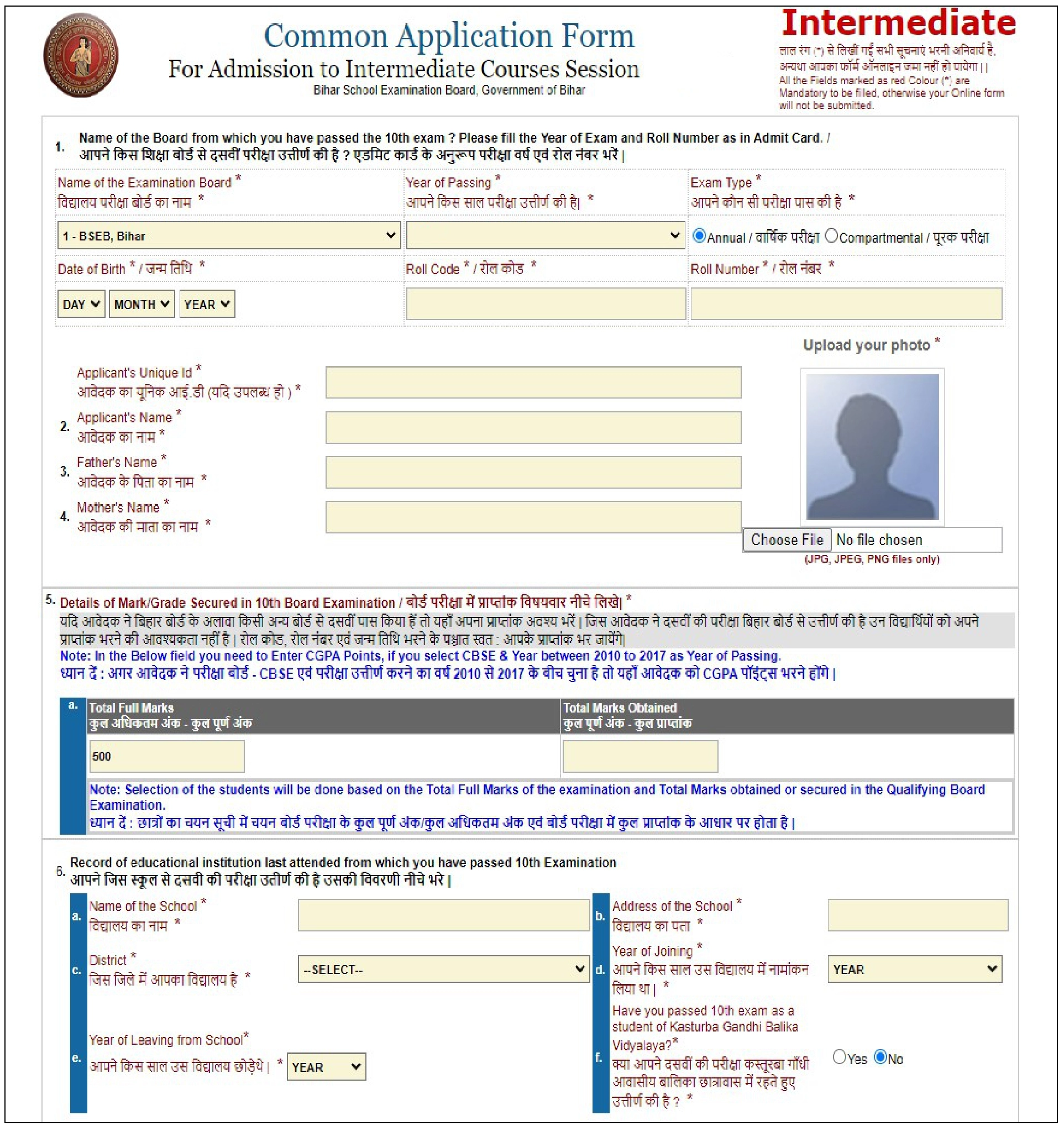
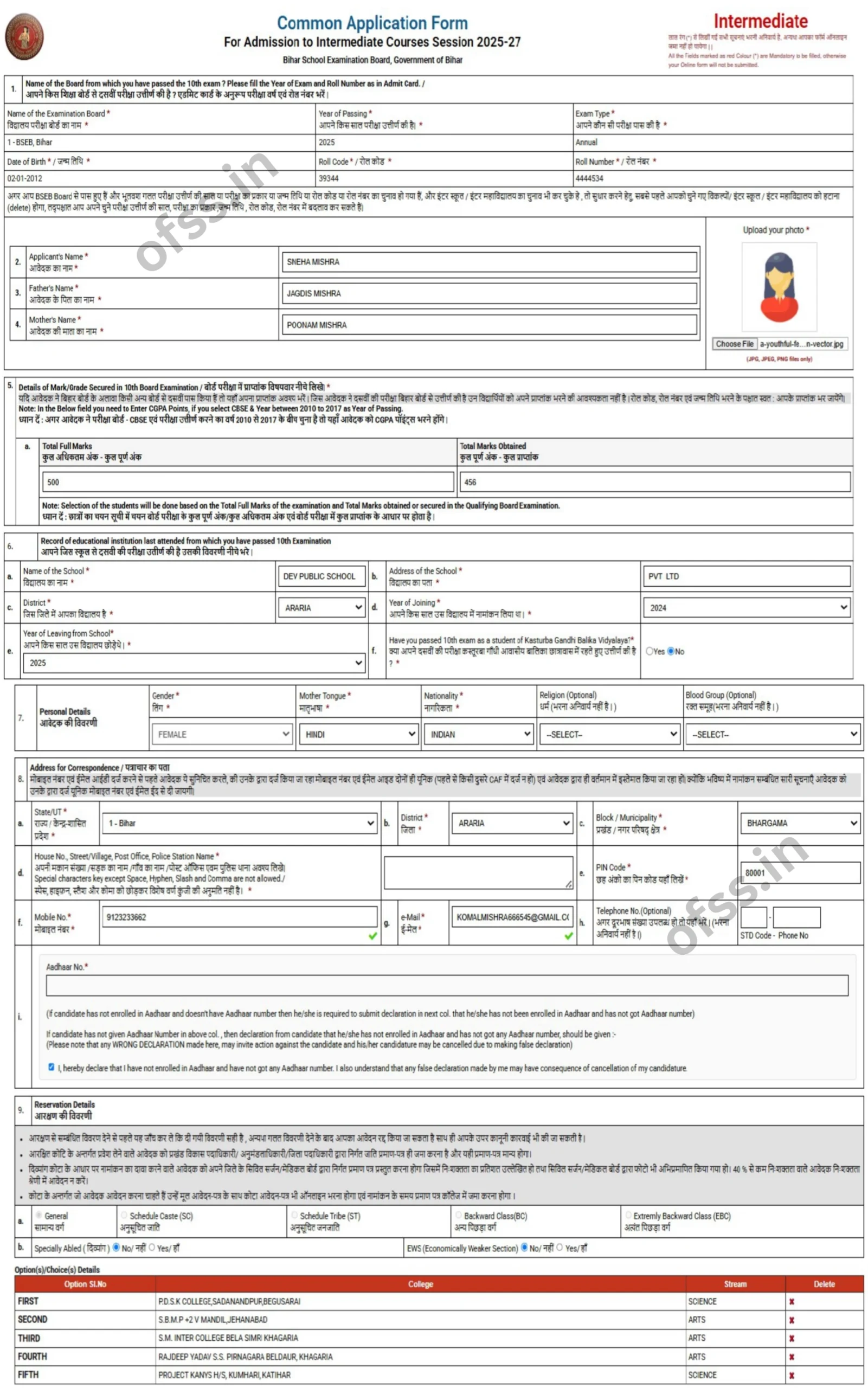
- In the BSEB Intermediate Admission Application Form, the Name of the Board from which you passed the 10th Exam? Please fill in the Year of the Exam and Roll Number as in the Admit Card.
- Here you have to enter your Board Information like BSEB, CBSE, ICSE, etc.
- Now Select your Year of Passing like 2026, 2025, 2024, 2023, 2022, 2021…
- Now Select your Exam Types such as Annual Exam or Compartmental Exam.
- Here Enter your Date of Birth.
- After that, Enter your Roll Code.
- Then, Enter your Roll Number.
- Now Enter the Student/Applicant’s Name.
- Here you need to Enter your Father’s Name.
- After that Enter your Mother’s Name.
- Now fill in the Details of Marks/Grade Secured in the 10th (matric) Board Examination.
-
After that, Upload the scanned copy of the Passport Size Photograph in the application form. Kindly, Don’t forget to upload your recent passport size photograph. Please Note: Now you have to upload all the required documents here in PDF or JPG format. Kindly, Keep in mind that the dimensions and shape of the document are requested and uploaded in the dimensions and shape accordingly.
6. Record of Educational Institute Last Attended from which you have passed the 10th Examination.
- आपने जिस स्कूल से दसवीं की परीक्षा पास की हैं, उसकी विवरण भरें।
- Here you need to Enter your Name of the School.
- Now, the Address of the School.
- Now Enter the District in which your School is Located.
- After this, Enter what Year of Joining school.
- Now you have to enter the Year of Leaving from School.
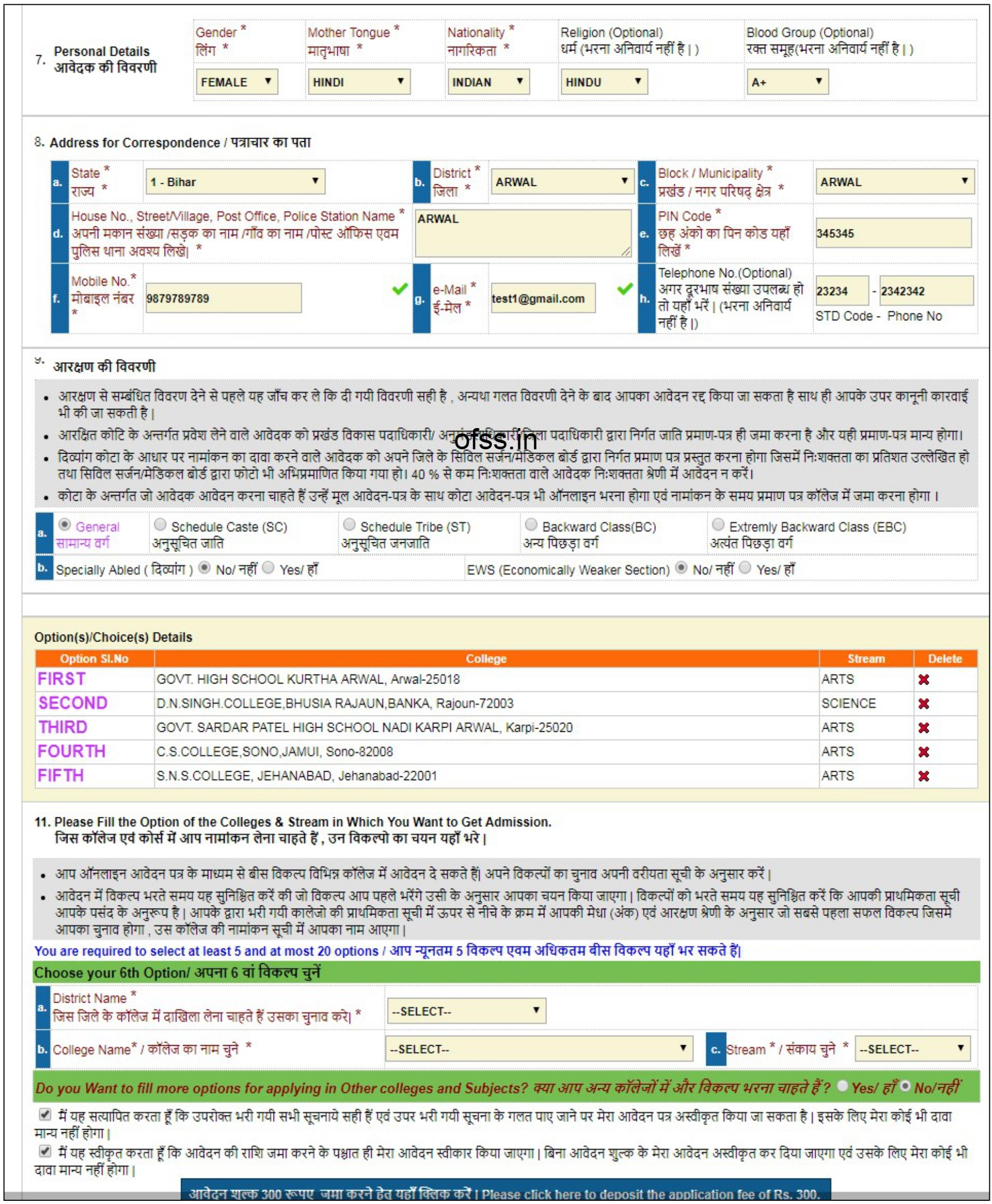
7. Personal Details
- Now it’s Time to fill in your Personal Details.
- Select your Gender.
- Now Select your Mother Tounge.
- Now Select Nationality.
- Now Select Religion (please note, this is optional).
- Now Select your Blood Group (please note, this is optional).
8. Address for Correspondence
- Now it’s time to fill in your Address for Correspondence.
- Select your State.
- Now Select your District.
- Now Select Block/Municipality.
- Then Write your House Number, Street/Village, Post Office, and Police Station Name.
- Now Enter your Pin Code.
- After that, Enter your Mobile Number.
- Then Enter your E-Mail ID.
- After that, Enter your Telephone Number (please note, this is optional).
9. Reservation Details
- Now here you have to fill the Reservation Details.
- आरक्षण से संबंधित विवरण देने से पहले यह जान ले की, दी गयी विवरण सही हैं, अन्यधा गलत ठिठरणी देने के बाद आपका आवेदन रद्द किया जा सकता है साथ ही आपके उपर कानूनी कारवाई जा सकती हैं।
- आरक्षित कोटि के अन्तर्गत प्रवेश लेने वाले आवेदक को प्रखंड विकास पदाधिकारी/ अनुमंडलाधिकारी/जिला पदाधिकारी द्वारा निर्गत जाति प्रमाण-पत्र ही जमा करना है और यही प्रमाण-पत्र मान्य होगा।
- दिव्यांग कोटा के आधार पर नामांकन का दावा करने ढाले आदेदक को अपने जिले के सिविल सर्जन/मेडिकल बोर्ड द्वारा निर्गत प्रमाण पत प्रस्तुत करना होगा जिसमें निःशक्तता का प्रतिशत उल्लेखित हो, तथा सिविल सर्जन/मेडिकल बोर्ड द्वारा फोटो भी अभिप्रमाणित किया गया हो। 40 % से कम निःशक्तता वाले आदेदक निःशक्तता श्रेणी में आवेदन न करें।
- कोटा के अन्तर्गत जो आठेदक आठेदन करना चाहते हैं उन्हें मूल आठेदन-पत्र के साथ कोटा आवेदन-पत्र भी ऑनलाइन भरना होगा एवं नामांकन के समय प्रमाण पत्र कॉलेज में जमा करना होगा।
10. Now here you have to fill in Caste, Abled, EWS Details
| General | Scheduled Castes (SC) |
| Scheduled Tribe (ST) | Backward Class (BC) |
| Extremely Backward Class (EBC) |
इसके बाद आपको, Specially Abled (दिव्यांग) हाँ/ना में चुनना हैं। फिर EWS में हाँ/ना का चुनाव करना हैं

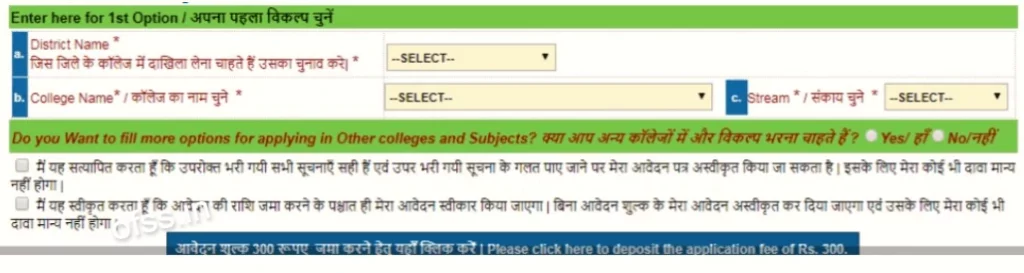
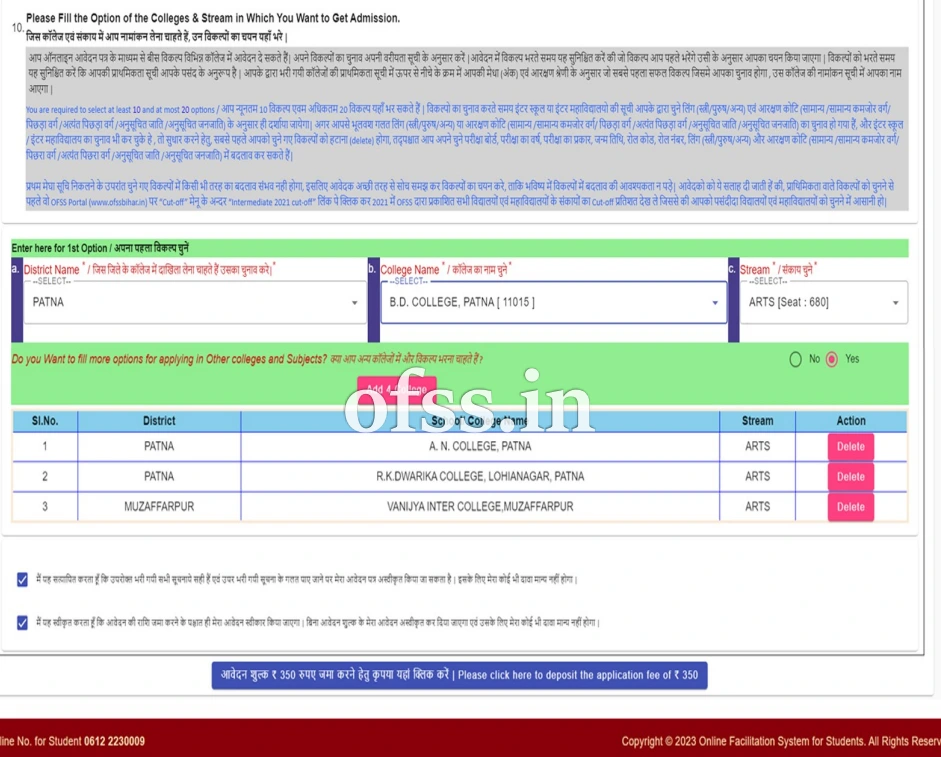
11. Please Fill the Option of the Colleges & Stream in which you want to Get Admission
- आप ऑनलाइन आवेदन पत्र के माध्यम से बीस विकल्प विभिन्न कॉलेज में आवेदन दे सकते हैं। अपने विकल्पों का चुनाव अपनी वरीयता सूचि के अनुसार करें। आवेदन भरते समय यह सुनिश्चित करें की जो विकल्प आप पहले भरेंगे उसी के अनुसार आपका चुनाव किया जायेगा। विकल्पों को भरते समय ये सुनिश्चित करें की, आपकी प्राथमिकता सूचि आपके पसंद की अनुरूप हैं। आपके द्वारा भरी गयी कॉलेजों का प्राथमिकता सूचि में ऊपर से निचे के क्रम में आपकी मेधा (अंक) एवं आरक्षण श्रेणी के अनुसार जो सबसे पहले पहला सफल विकल्प जिसमे आपका चुनाव होगा, उस कॉलेज की नामांकन सूचि में आपका नाम आएगा।
- आप न्यूनतम 5 विकल्प एवं अधिकतम 20 विकल्प यहां भर सकते हैं। विकल्पों का चुनाव करते समय इंटर स्कूल या इंटर महाविद्यालयों की सूचि आपके द्वारा चुने लिंग (स्त्रीलिंग/पुलिंग) एवं आरक्षण कोटि (समान्य/ पिछड़ा वर्ग/ अत्यंत पिछड़ा वर्ग/ अनुसूचित जाति/ अनुसूचित जनजाति) के अनुसार ही दर्शाया जायेगा। अगर आपके भूलवश गलत लिंग (स्त्री/पुरुष) या आरक्षण कोटि (समान्य/ पिछड़ा वर्ग/ अत्यंत पिछड़ा वर्ग/ अनुसूचित जाति/ अनुसूचित जनजाति) का चुनाव हो गया हैं। और इंटर स्कूल या इंटर महाविद्यालयों का चुनाव भी कर चुके हैं। तो सुधर करने हेतु, सबसे पहले आपको चुने गए विकल्पों को हटाना (delete) होगा।
After filling in all the details, fill in your preference/choice for enrollment in the school/college, you can choose a minimum of 05 options and a maximum of 20 options.
- Now you have to Click on the Save your Details Button.
- Carefully read all the details filled in the application form. If something is wrong, Correct It.
After filling in all the information click on the submit button. By doing this a preview of the Common Application Form filled by you will appear. If you think that the details shown by you in Preview are correct then click on Confirm button. After clicking the Confirm button, the mobile number will be redirected to the Confirmation Page.
- Keep your User ID and Password in mind when you are registered so that in the future you can log in to the portal again and check the merit list.
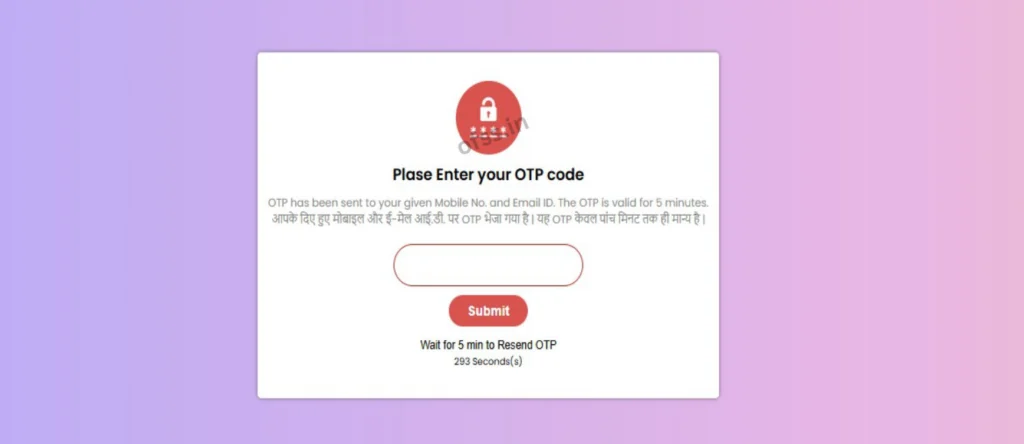
- Now you have to enter your personal Email ID & Mobile Number on this page, then click on the button Verify using OTP.
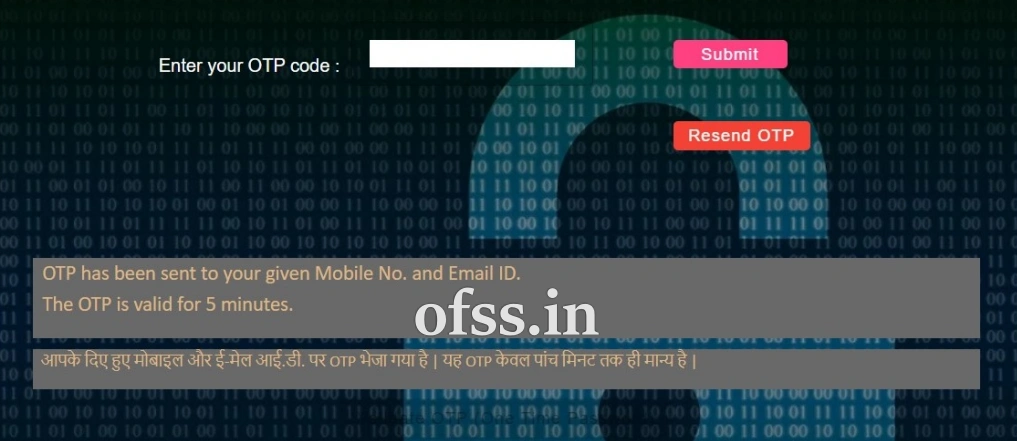
- After this an OTP will be sent to the Email ID or Mobile Number, now as soon as you verify the OTP, the OFSS Bihar Intermediate Admission 2026 Application Form will open in front of you.
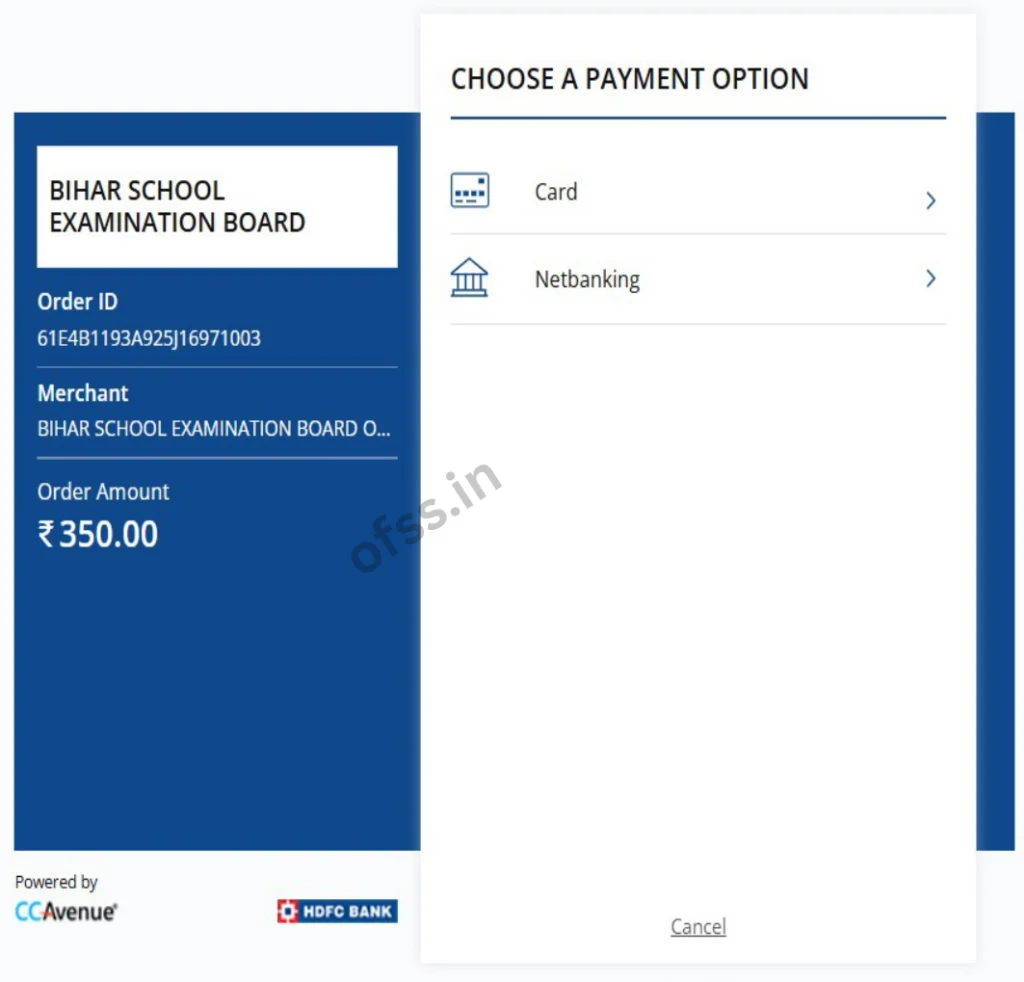
After ensuring the mobile number, you will be redirected to the payment page for payment. Select the method of payment like – Vasudha Kendra, Payment Gateway (Net Banking, Debit Card & Debit Card), etc.
- After that click on the confirm button, and now, a page will appear with all the filled details.
- Now you have to pay the Bihar Board Intermediate 11th Application Fee 350₹/- here, which you will be able to pay through UPI, Debit Card, Credit Card, and Net Banking.
- After the completion of the payment process, you will get the Transaction ID. You will get the option to print a copy of the filled application form.
- As soon as your payment is successful, a payment slip will open in front of you, download it and save it.

Adhar card exist dikha raha hai, what is soluction
Kya aapne pehle form bharne ki koshish ki thi aur payment fail ho gaya tha? Agar haa, to nya form bharne ke bajaye “Student Login” par jakar apne Mobile Number aur Password se login karein. Wahan aapko aapka purana incomplete form mil jayega.
Adhar card exist dikha raha hai
Agar aapne pahle login nahi kiya h, to “Forgot Password” par click krke apna password recover kre aur login karke check kare ki kya form submit ho chuka hai? Agar aapne phle apply nhi kiya hai, to thoda wait krke browser ki Cache/History clear krke dubara try kre. kabhi-kabhi portal ke server issue ki wajah se bhi aisa hota hai.
Sar 11th me online karte samay OTP nhi a raha hai
Heavy server ke wajah se ho skta hai, aap off time me try kijiye
Admission karana hai
Aap online form bhariye, uske bad hi admission hoga
11th admission karvane hetu online admission
Upar diye gye link se aawedan kre
Sar Mera ye number 79039914 hai ye Gmail hai dilkhush79cm@gmail.com hai ye dono diye the phir bhi OTP nhi a raha hai
Aap late night ya early morning me try kijiye
Hiii
Hello
Hello sir
Hello Pawan
Yaha onlein karne paisa bhi lagta hai ki
Ha 350rs/-
College please sir